Inicio Pérdida de calor Cajones Mezcla Inteligente (2K) Espaciado / Listones Flexión de estantes Escaleras Sobre el proyecto FAQ Premium Access Mi Cuenta
No conectado
-
Drawers - Kitchen
11.06.2026 Drawers
Stairs - Workshop
17.04.2026 Stairs
Smart Mix - Epoxy
22.08.2026 Smart Mix
Shelves - Living Room
05.09.2026 Shelves
Spacing - Fence
12.09.2026 Spacing
Drawers - Bathroom
20.09.2026 Drawers
Guarda tus proyectos
y consulta el historial de cálculos.
Ya tengo una clave de licencia +
CalcWood Logo
CALCWOOD.
Powered by BUILD FOR FUN
VERSIÓN BÁSICA
LAS FUNCIONES PRO PRO ESTÁN BLOQUEADAS

Calculadora de cajones, guías y muebles

HERRAMIENTA DE CARPINTERÍA ONLINE Y GENERADOR DE LISTAS DE CORTE
Counter
Proyectos calculados: 0
¿Ayuda con términos?
Abajo encontrarás consejos prácticos y búsqueda rápida en las tarjetas de conocimiento.
Seleccionar tipo de guía
Cargando vista previa...
+
-
+
-
+
-
Profundidad del lateral (sin trasera)
+
-
▼
+
-
+
-
Frentes, holguras y construcción del cajón
PRO
+
LISTA DE CORTE Y FORMATO
PRO
+
¡Enlace copiado!
✕
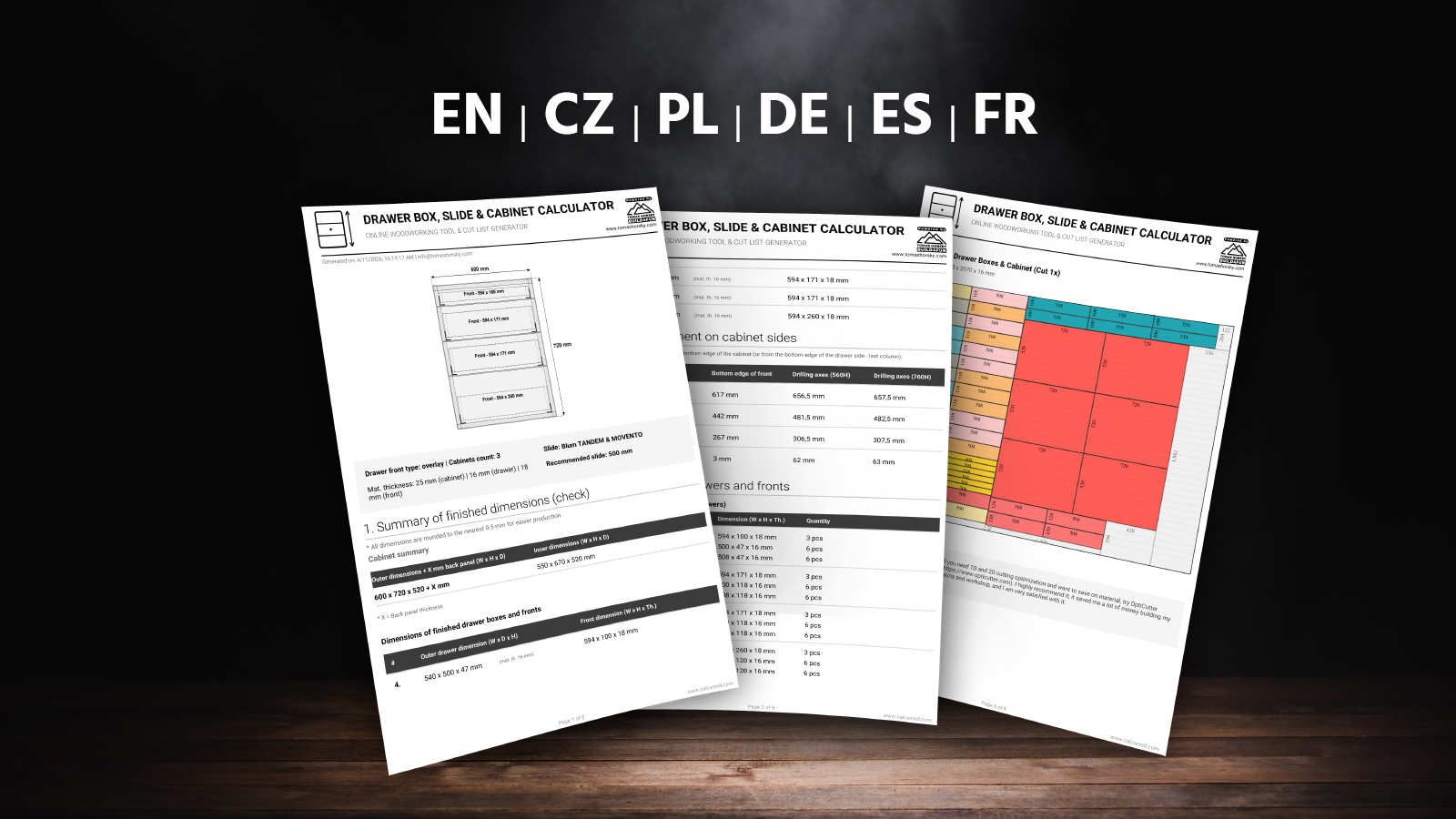
Vista previa en PDF
* Esta es solo una muestra simplificada. Tu PDF contendrá las dimensiones exactas para tu proyecto.

¿Cómo te ayuda en la práctica la calculadora de cajones?

Descripción general de la calculadora e introducción

Mira un breve resumen de por qué se creó esta herramienta y qué puede hacer. El video incluye subtítulos en español (otros idiomas disponibles en la configuración del reproductor).

Características principales:

  • Blum y Clásica: Cambia entre guías ocultas (Tandem/Movento) y guías de bolas clásicas.
  • Frentes solapados y encastrados: Recalcula automáticamente todas las profundidades y holguras.
  • Alturas individuales y cálculo inteligente: ¿Necesitas un cajón más alto? Simplemente introduce su tamaño y el resto se calcula automáticamente para adaptarse al espacio restante.
  • Guardar configuración: Guarda fácilmente tu proyecto y vuelve a él en cualquier momento.
  • Lista de corte Pro (OptiCutter): Genera automáticamente un diseño gráfico para la sierra de paneles con el máximo rendimiento del material. El PDF incluye la ubicación exacta de las guías, los ejes de perforación y un código QR para volver a tu configuración.
  • Formato avanzado: Establece dimensiones de tablero personalizadas, deduce automáticamente el canteado ABS y haz un seguimiento de la dirección de la veta de la madera para frentes de cajones que combinen perfectamente.
  • Multiplicador de muebles (repetidor): ¿Necesitas el mismo mueble con cajones varias veces? Simplemente introduce la cantidad, y la lista de corte generará piezas para todos los conjuntos a la vez.
  • Multilenguaje y Unidades: Funciona con la capacidad de cambiar entre el sistema métrico (mm) e imperial (pulgadas/fracciones).
  • Y mucho más...

Reglas básicas y consejos para construir cajones

El diseño y montaje de cajones tiene reglas claras. Aquí tienes un resumen de los consejos clave que te ahorrarán muchos errores y material desperdiciado:

Cómo maximizar la capacidadCon frentes solapados, hay un punto ciego debajo de los cajones. Normalmente, las cajas interiores se hacen de la misma altura para ser intercambiables. Pero si las extiendes hacia abajo, ganarás el máximo espacio. (Esta calculadora puede calcularlo en la Configuración Experta).
¿Instalas Blum por primera vez?Si trabajas con guías ocultas por primera vez, descarga el manual PDF original para TANDEM o MOVENTO. Allí encontrarás todas las dimensiones de montaje.
Ancho interior exacto (LW)Con guías ocultas, cada milímetro cuenta. Mide siempre el ancho interior (LW) después de montar el mueble. Un error de más de 1 mm hará que las guías rocen o no encajen.
Grosor del material del cajónPresta atención al material. Los herrajes Blum están diseñados para un grosor lateral de máx. 16 mm. Con melamina clásica de 18 mm, debes estrechar el fondo y fresar los lados por debajo.
Frente solapado vs encastradoUn frente solapado cubre los bordes y oculta pequeñas imprecisiones. Un frente encastrado queda a ras del borde: se ve genial, pero requiere un montaje de precisión absoluta y un mueble perfectamente a escuadra.
Escuadra del cajón (Diagonales)Al montar el cajón, mide siempre ambas diagonales. Deben ser exactamente iguales. Si el cajón está torcido, las guías rozarán y el frente nunca ajustará uniformemente.
Holguras entre frentes (Truco de las cartas)La holgura estándar es de 2 a 3 mm. Truco práctico: Toma una baraja de cartas común, divídela exactamente por la mitad y colócala a izquierda y derecha en la holgura. Esto centrará perfectamente el frente sin medir.
Elección de la longitud de la guíaLas guías tienen longitudes estándar (generalmente en pasos de 5 cm). Para una profundidad atípica (ej. 470 mm), elige la más corta más cercana (450 mm). Regla de oro: el cajón completo debe ser 10-15 mm más corto que la profundidad interior del mueble.
Guías de bolas clásicasSe atornillan al lateral y requieren una holgura de montaje absolutamente precisa (generalmente 12,7 mm por lado). Si el cajón es más ancho, roza; si es más estrecho, puede caerse.
Ajuste de los frentesIncluso perforando con precisión, tendrás que ajustar los frentes al final. Tandem permite ajuste de altura, Movento añade ajuste lateral, de profundidad e inclinación. Las ruedas permiten perfeccionar las holguras.
Dirección de la veta en los frentesSi usas decoración de madera, piensa en la dirección de la veta antes de cortar. Queda mejor cuando la veta fluye suavemente de un frente a otro. Vigila la orientación de las piezas en la lista de corte.
¿Cajones grandes y pesados?Para cajones grandes (ej. ollas), elige guías con mayor capacidad de carga (ej. 40 kg o 70 kg). No olvides que el fondo también debe soportar esta carga. Comprueba fácilmente la flexión en mi calculadora de flexión de estantes.

Valoraciones y Reseñas

Comprobando las valoraciones de la calculadora...
Cargando reseñas...
✕

¿Te ayudó la calculadora?

Tu opinión ayuda a mejorar CalcWood para todos los carpinteros y aficionados.

UPDATES & CHANGELOG
+
v1.18 ( October 2026)
  • The metric and imperial unit switch is now available in every language version of the calculator.
  • Switching units preserves the drawer count, expert settings and individually adjusted dimensions. Unchanged values return to their original units without losing precision.
  • Every user-modified value is highlighted in yellow, making it immediately clear which dimensions were set manually and which remain automatic.
v1.17 ( September 2026)
  • Improved individual front and drawer box input using consistent numbering from bottom to top.
  • The same numbering is now used in the input form, visual preview, results and PDF export.
  • Calculation and validation logic was improved to handle unusual or physically impossible values more safely.
v1.16 ( September 2026)
  • Added a new “Quick workshop result” block directly above the detailed calculation results.
  • The summary now instantly shows the recommended slide, front dimensions, drawer box dimensions and the number of slide pairs to buy.
  • This block works as a quick workshop card: the most important production dimensions are visible immediately, without scrolling through the full drilling and position breakdown.
  • The summary respects both the number of drawers and the number of identical cabinets, so total parts and slide quantities are shown correctly.
v1.15 ( June 2026)
  • Added full fraction support for the imperial system (inches). When you switch the calculator to inches, all results and PDF exports are now automatically displayed in easy-to-read fractions (up to 1/16 inch precision).
  • Decimal numbers entered as input are automatically converted to the nearest practical fraction, making workshop tasks much easier.
v1.14 ( May 2026)
  • Improved stability of the visual preview when loading a shared URL.
  • Fixed display of material thickness limits when using imperial units (inches).
v1.13 ( April 2026)
  • Added a new "Maximize drawer capacity" feature in the expert settings.
  • This function allows you to utilize the dead space under drawers when using overlay fronts and thick cabinets. Inner boxes are automatically extended downwards to maximize storage space.
  • Updated and clarified tooltip texts for a better understanding of the calculator's behavior.
v1.12 ( March 2026)
  • Added the option to choose the cutting layout method: "In strips" (easier cutting on a panel saw) or "Tetris" (maximum material yield).
  • Major optimization of the sharing URL – thanks to shortened parameter names and smart rounding, the link is now approximately 50% shorter.
  • Completely reworked calculation sharing on mobile devices – now uses native phone sharing, solving the issue with long URLs being cut off in apps (e.g., Messenger).
  • Fixed an issue with URL parameters being cut off when sharing to Facebook.
v1.11 ( March 2026)
  • Added the ability to include cabinet parts directly into the cut list (choice between a full top panel or support rails).
  • New features for easily sharing a specific calculation (URL link and social media icons) have been moved to the main panel and are now unlocked for all users.
  • Optimized the graphical layout of the export and sharing buttons – cleaner display on desktops and perfect adaptation for mobile devices.
  • Added explanatory tooltips to the new cut list settings to make it easier to understand which parts are calculated.
v1.10 ( March 2026)
  • Added a new graphical cutting plan feature directly into the exported PDF.
  • Partnered with OptiCutter to provide highly efficient cutting optimization (material yield over 90%).
  • Added the option to maintain wood grain direction for drawer fronts in the cutting plan.
  • Ability to define custom board sizes (separately for fronts and drawer boxes).
  • New input for ABS edge banding thickness (the calculator automatically deducts the edge from the cutting dimensions).
  • Overall redesign and improvement of the exported PDF document for maximum clarity in the workshop.
  • Added a multiplier (repeater) function for the cutting plan – easily generate parts for multiple identical drawer sets.
v1.02 (March 2026)
  • Added support for 0 mm cabinet material thickness (outer dimensions now equal inner dimensions).
  • Fixed handling of zero thickness in JavaScript and corrected its display in the PDF export.
  • Complete fix for tooltip centering on mobile devices.
  • Improved logic for displaying right and left columns.
  • Updated and expanded tooltips for input fields.
  • Added automatic values (Inner dimensions) below the Outer cabinet width and height fields.
v1.01 (February 2026)
  • Added new modern Dark-mode design for the calculator.
  • Improved expert settings functionality for professionals.
Have a suggestion or found a bug?
+