Home Heat Loss Drawers Smart Mix (2K) Spacing / Slats Shelf Sag Stairs About Project FAQ Premium Access My Account
Not logged in
-
Drawers - Kitchen
11.06.2026 Drawers
Stairs - Workshop
17.04.2026 Stairs
Smart Mix - Epoxy
22.08.2026 Smart Mix
Shelves - Living Room
05.09.2026 Shelves
Spacing - Fence
12.09.2026 Spacing
Drawers - Bathroom
20.09.2026 Drawers
Save your projects
and browse calculation history.
I already have a License Key +
CalcWood Logo
CALCWOOD.
Powered by BUILD FOR FUN
BASIC VERSION - FREE
PRO PRO FEATURES ARE LOCKED

Drawer Box, Slide & Cabinet Calculator

ONLINE WOODWORKING TOOL & CUT LIST GENERATOR
Counter
Calculator worked hard on projects: 0
Need help with the terms?
Practical tips and quick search in the knowledge cards are waiting below.
Select slide type
Loading preview...
+
-
+
-
+
-
Side panel depth (without back)
+
-
▼
+
-
+
-
Fronts, Gaps & Drawer Box Settings
PRO
+
CUT LIST & FORMATTING
PRO
+
Link copied!
✕
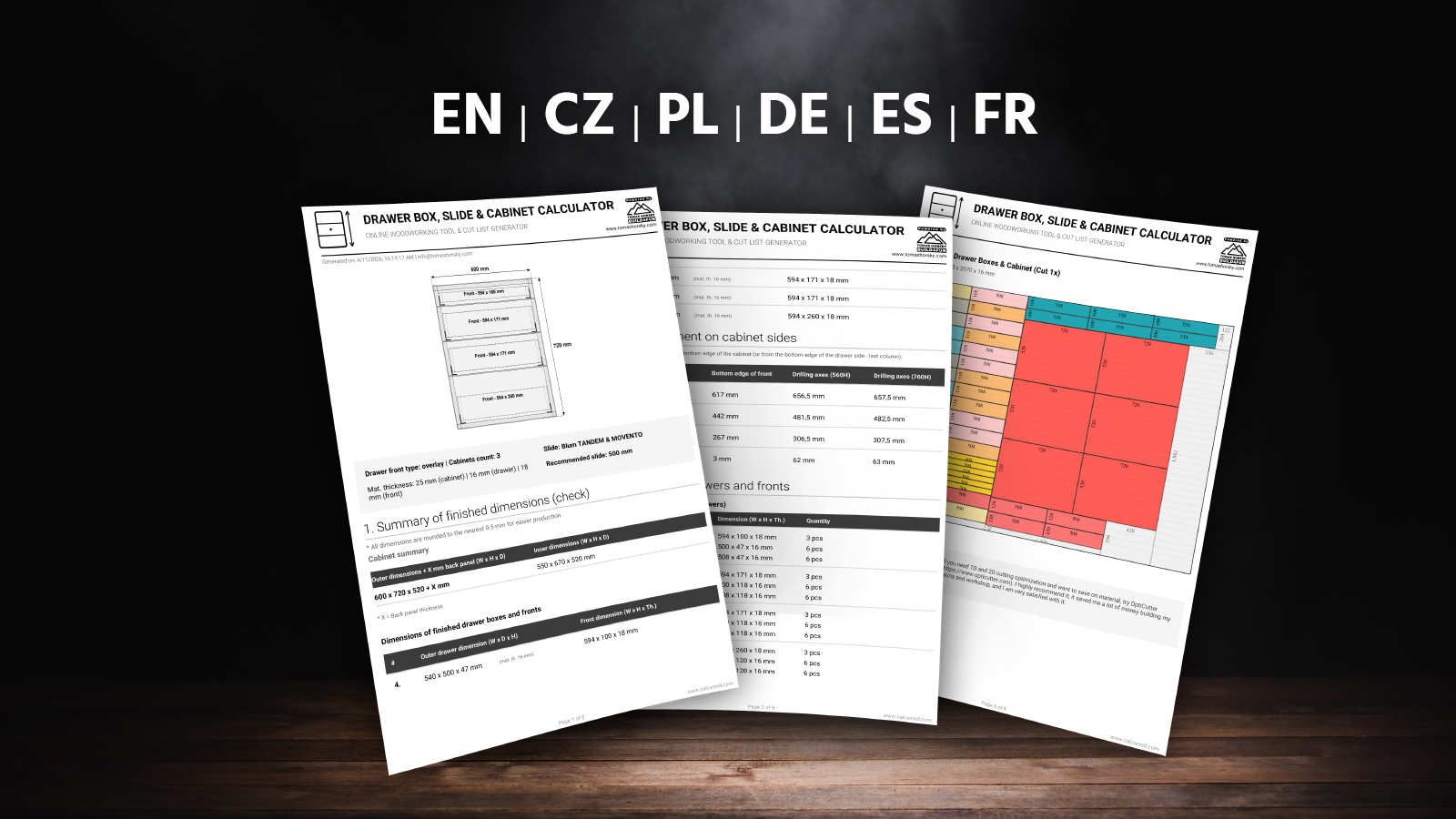
PDF Preview
* This is just a simplified sample. Your PDF will contain the exact dimensions for your project.

How does the drawer calculator help in practice?

Calculator Overview & Introduction

Watch a quick overview of why this tool was created and what it can do. The video includes English subtitles (other languages available in player settings).

Key Features:

  • Blum & Classic: Switch between undermount slides (Tandem/Movento) and classic ball-bearing slides.
  • Overlay & Inset fronts: Automatically recalculates all depths and clearances.
  • Individual heights & smart calculation: Need one drawer higher? Just enter its size and the rest is automatically calculated to fit the remaining space.
  • Save configuration: Easily save your project and return to it anytime later.
  • Pro Cut List (OptiCutter): Automatically generates a graphical layout for the panel saw with maximum material yield. The PDF includes exact slide placement, drilling axes, and a QR code to return to your configuration.
  • Advanced Formatting: Set custom board dimensions, automatically deduct ABS edge banding, and keep track of wood grain direction for perfectly matching drawer fronts.
  • Cabinet multiplier (repeater): Need the same cabinet with drawers multiple times? Just enter the quantity, and the cut list will generate parts for all sets at once.
  • Multi-language & Units: Works in English with the ability to switch between metric (mm) and imperial (inches/fractions).
  • And much more...

Basic rules and tips for building drawers

Designing and assembling drawers has clear rules. Here are 15 practical points, ordered from the most important setup decisions to workshop details that save time, nerves, and material:

Start with the correct cabinet dimensionsFirst decide whether you are entering the outside cabinet size or the clear inside opening. The calculator can handle both. If you already know the inner opening, set cabinet material thickness to 0 so the side panels are not deducted twice.
Exact internal width (LW)With undermount slides, every millimeter counts. Always measure the internal width (LW) after assembling the cabinet. If you are off by more than 1 mm, the slides will rub or won't click in at all.
Installing Blum for the first time?If you are working with undermount slides for the first time, download the original PDF manual for TANDEM or MOVENTO. You will find all the mounting dimensions there.
TANDEM vs. MOVENTOTANDEM is a solid base for standard drawers and mainly gives height adjustment. MOVENTO is a more precise and more comfortable solution with higher load options and 4D adjustment. For wide, heavy, or highly visible drawers, MOVENTO usually makes more sense.
Drawer material thicknessPay attention to the material. Blum hardware is mainly designed for drawer side thickness from 11 to 16 mm. With classic 18 mm melamine, you must narrow the bottom and rout the sides from below, otherwise you won't be able to attach the slide.
Overlay vs. Inset frontAn overlay front covers the cabinet edges and hides small inaccuracies more easily. An inset front sits flush with the cabinet edge. It looks cleaner, but needs a precise square cabinet and well-controlled gaps.
Gaps between frontsA common front gap is 2 to 3 mm. Too small a gap shows every inaccuracy and fronts may rub. Too large a gap looks cheap. The calculator already includes these gaps when it divides the front heights.
Card trick for mounting frontsA workshop trick: take an ordinary deck of playing cards, place it in the gap, split it exactly in half, and use it on the left and right, or top and bottom. It helps center the front nicely without complicated measuring.
Choosing the slide lengthSlides come in standard lengths, usually in 50 mm steps. If your depth is atypical, choose the nearest shorter slide. The drawer with the slide must remain shorter than the clear internal cabinet depth so it does not hit the back.
Classic ball-bearing slidesClassic ball-bearing slides are mounted on the drawer side and need an accurate side clearance, typically 12.7 mm on each side. If the drawer is wider, it rubs. If it is narrower, it may have play or fall out.
Individual front and box heightsIf one drawer needs to be taller, enter its front or box height manually. The calculator redistributes the remaining space automatically. This is useful for a deep bottom drawer with smaller drawers above it.
How to maximize capacityWith overlay fronts, there is dead space under the drawers. Normally, inner boxes are made the same height to stay interchangeable. If you extend them downward, you gain maximum storage. This calculator can calculate it in the Expert settings.
Cut list and cabinet quantityIf you are building several identical cabinets, use the cabinet multiplier. The cut list will then calculate all parts for all sets at once. This is more accurate for ordering boards, edge banding, and slides.
Edge banding and wood grainFor fronts, count with edge banding all around. For drawer boxes and cabinets, usually only visible edges matter. The calculator can use smart edge deduction and keep grain direction on fronts so the decor does not look like random offcuts.
Large and heavy drawers?For large drawers used for pots, tools, or supplies, choose higher load slides such as 40 kg or 70 kg. But the drawer construction must also carry the load, especially the bottom. You can check deflection in my shelf sag calculator.

Ratings & Reviews

Checking calculator ratings...
Loading reviews...
✕

Did the calculator help you?

Your feedback helps improve CalcWood for all woodworkers and DIYers.

UPDATES & CHANGELOG
+
v1.18 ( October 2026)
  • The metric and imperial unit switch is now available in every language version of the calculator.
  • Switching units preserves the drawer count, expert settings and individually adjusted dimensions. Unchanged values return to their original units without losing precision.
  • Every user-modified value is highlighted in yellow, making it immediately clear which dimensions were set manually and which remain automatic.
v1.17 ( September 2026)
  • Improved individual front and drawer box input using consistent numbering from bottom to top.
  • The same numbering is now used in the input form, visual preview, results and PDF export.
  • Calculation and validation logic was improved to handle unusual or physically impossible values more safely.
v1.16 ( September 2026)
  • Added a new “Quick workshop result” block directly above the detailed calculation results.
  • The summary now instantly shows the recommended slide, front dimensions, drawer box dimensions and the number of slide pairs to buy.
  • This block works as a quick workshop card: the most important production dimensions are visible immediately, without scrolling through the full drilling and position breakdown.
  • The summary respects both the number of drawers and the number of identical cabinets, so total parts and slide quantities are shown correctly.
v1.15 ( June 2026)
  • Added full fraction support for the imperial system (inches). When you switch the calculator to inches, all results and PDF exports are now automatically displayed in easy-to-read fractions (up to 1/16 inch precision).
  • Decimal numbers entered as input are automatically converted to the nearest practical fraction, making workshop tasks much easier.
v1.14 ( May 2026)
  • Improved stability of the visual preview when loading a shared URL.
  • Fixed display of material thickness limits when using imperial units (inches).
v1.13 ( April 2026)
  • Added a new "Maximize drawer capacity" feature in the expert settings.
  • This function allows you to utilize the dead space under drawers when using overlay fronts and thick cabinets. Inner boxes are automatically extended downwards to maximize storage space.
  • Updated and clarified tooltip texts for a better understanding of the calculator's behavior.
v1.12 ( March 2026)
  • Added the option to choose the cutting layout method: "In strips" (easier cutting on a panel saw) or "Tetris" (maximum material yield).
  • Major optimization of the sharing URL – thanks to shortened parameter names and smart rounding, the link is now approximately 50% shorter.
  • Completely reworked calculation sharing on mobile devices – now uses native phone sharing, solving the issue with long URLs being cut off in apps (e.g., Messenger).
  • Fixed an issue with URL parameters being cut off when sharing to Facebook.
v1.11 ( March 2026)
  • Added the ability to include cabinet parts directly into the cut list (choice between a full top panel or support rails).
  • New features for easily sharing a specific calculation (URL link and social media icons) have been moved to the main panel and are now unlocked for all users.
  • Optimized the graphical layout of the export and sharing buttons – cleaner display on desktops and perfect adaptation for mobile devices.
  • Added explanatory tooltips to the new cut list settings to make it easier to understand which parts are calculated.
v1.10 ( March 2026)
  • Added a new graphical cutting plan feature directly into the exported PDF.
  • Partnered with OptiCutter to provide highly efficient cutting optimization (material yield over 90%).
  • Added the option to maintain wood grain direction for drawer fronts in the cutting plan.
  • Ability to define custom board sizes (separately for fronts and drawer boxes).
  • New input for ABS edge banding thickness (the calculator automatically deducts the edge from the cutting dimensions).
  • Overall redesign and improvement of the exported PDF document for maximum clarity in the workshop.
  • Added a multiplier (repeater) function for the cutting plan – easily generate parts for multiple identical drawer sets.
v1.02 (March 2026)
  • Added support for 0 mm cabinet material thickness (outer dimensions now equal inner dimensions).
  • Fixed handling of zero thickness in JavaScript and corrected its display in the PDF export.
  • Complete fix for tooltip centering on mobile devices.
  • Improved logic for displaying right and left columns.
  • Updated and expanded tooltips for input fields.
  • Added automatic values (Inner dimensions) below the Outer cabinet width and height fields.
v1.01 (February 2026)
  • Added new modern Dark-mode design for the calculator.
  • Improved expert settings functionality for professionals.
Have a suggestion or found a bug?
+